Z-Image Turbo Tested: Free Online, Local Setup and API Price
Z-Image Turbo is Alibaba's free 6B open-weight image model. Where to try it online, how to run it locally, API prices, and our 6-image test (Nov 2026).
Z-Image Turbo is a free, open-weight text-to-image model from Alibaba's Tongyi-MAI lab, released on November 26, 2025 under the Apache 2.0 license. It has 6 billion parameters, makes an image in 8 steps, fits on a consumer GPU with 16 GB of VRAM, and can write English and Chinese text inside images. You can try it free in the official Hugging Face and ModelScope demos, run it yourself in ComfyUI, diffusers or Ollama, or call it through an API for less than a cent per image. We paid $0.0039 per image in our test.
Verification note: The specs on this page come from Tongyi-MAI's GitHub README, the Hugging Face model card, the Z-Image technical report, ComfyUI's docs, Ollama's model page and fal's API docs, all read on November 7, 2026. On the same day we generated six images with Z-Image Turbo through EvoLink, a third-party API host, and turned one of them into a video. Kensa is an AI video generator. Since November 7, 2026 it also runs Z-Image Turbo in its AI Image Generator at 1 credit per image, and the last section covers the image-to-video step, which we sell.
Z-Image Turbo specs
| Z-Image Turbo | |
|---|---|
| Made by | Tongyi-MAI, Alibaba's Tongyi Lab |
| Released | November 26, 2025 |
| Size | 6B parameters |
| Architecture | Single-stream diffusion transformer (S3-DiT): text and image tokens go through one sequence |
| Steps | 8. In diffusers, num_inference_steps=9 gives 8 passes through the model; guidance must be 0 |
| Speed | Under a second per image on an H800 data-center GPU, according to Tongyi-MAI |
| Memory | Fits on consumer GPUs with 16 GB of VRAM |
| Text in images | English and Chinese |
| License | Apache 2.0, which allows commercial use |
| Editing | No. Turbo only generates images from text |
In December 2025, Tongyi-MAI reported that Z-Image Turbo ranked 8th overall on the Artificial Analysis text-to-image leaderboard and first among open-weight models. The technical report puts the whole training run for Z-Image at 314,000 H800 GPU hours, about $630,000.
Z-Image Turbo vs Z-Image and the other versions
Turbo is the fast version, distilled down to 8 steps. The full model, simply called Z-Image (some sites call it Z-Image Base), came out later and uses 50 steps.
| Model | Released | Steps | Does |
|---|---|---|---|
| Z-Image Turbo | November 26, 2025 | 8, no guidance | Text-to-image |
| Z-Image | January 27, 2026 | 50, with guidance | Text-to-image, from 512 × 512 up to 2048 × 2048 pixels in area |
| Z-Image-Edit | Not released | 50 | Image editing |
| Z-Image-Omni-Base | Not released | 50 | Generation and editing |
As of November 7, 2026, the official README still lists Z-Image-Edit and Z-Image-Omni-Base as "to be released".
Pick Turbo for speed and low cost. Pick Z-Image when you want guidance and negative prompts and can wait for 50 steps.
Is Z-Image Turbo free?
Yes. The weights are free to download from Hugging Face and ModelScope, and the Apache 2.0 license allows commercial use. Running it yourself costs only your own hardware. To try it without installing anything, Tongyi-MAI links two free demos:
- Z-Image Turbo on Hugging Face Spaces. It runs on Hugging Face's ZeroGPU, which limits how much free users can generate each day.
- The Z-Image Turbo page in ModelScope's image generation studio, linked from the official README.
Hosted APIs charge per image (prices below). Kensa's AI Image Generator runs it too, at 1 credit per image, and hands the result straight to image-to-video. Plenty of unofficial "Z-Image Turbo online" sites have also appeared since launch. They are third-party wrappers, not Tongyi-MAI.
How to run Z-Image Turbo locally
You can run Z-Image Turbo locally in ComfyUI, in Python with diffusers, or with Ollama on a Mac.
ComfyUI. Update ComfyUI first; older builds lack the nodes. Then put three files in place:
z_image_turbo_bf16.safetensorsinmodels/diffusion_models/qwen_3_4b.safetensors(a Qwen3 4B text encoder) inmodels/text_encoders/ae.safetensors(the VAE) inmodels/vae/
diffusers (Python). Z-Image support is merged into diffusers; the model card suggests installing diffusers from source for the newest features.
import torch
from diffusers import ZImagePipeline

pipe = ZImagePipeline.from_pretrained("Tongyi-MAI/Z-Image-Turbo", torch_dtype=torch.bfloat16)
pipe.to("cuda")

image = pipe(
    prompt="a chalkboard sign that says OPEN LATE",
    height=1024,
    width=1024,
    num_inference_steps=9,  # = 8 passes
    guidance_scale=0.0,     # Turbo models need 0
).images[0]
image.save("z-image-turbo.png")
Ollama (macOS only). As of November 7, 2026, Ollama's image models only run on macOS. The default fp8 download is 13 GB and the full-precision bf16 one is 33 GB:
ollama run x/z-image-turbo "a cat holding a sign that says hello world"
How much does the Z-Image Turbo API cost?
Hosted APIs charge about half a cent per image or less, so 1,000 images cost $4–$12 depending on the host and the image size.
| Host | Listed price | 1024 × 1024 | 1536 × 1536 |
|---|---|---|---|
| fal | $0.005 per megapixel (+$0.0025 if you turn on prompt expansion) | about $0.005 | about $0.012 |
| EvoLink | "from $0.0036" per image | $0.0039 billed in our test | $0.0039 billed in our test |
EvoLink billed us the same $0.0039 for a 768 × 1376 image and a 1536 × 1536 one. fal charges by size, so large images cost more there. Prices were checked on November 7, 2026.
We tested Z-Image Turbo: 6 prompts
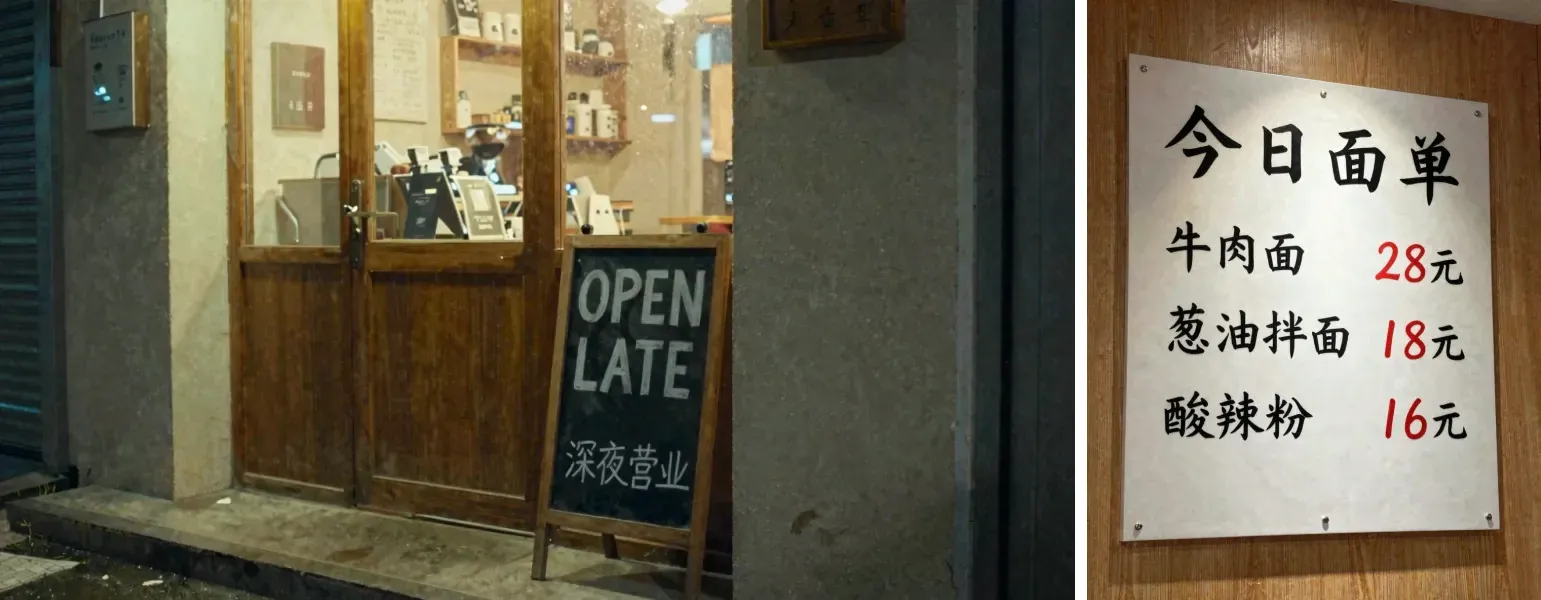
We sent six prompts to Z-Image Turbo at the same time through EvoLink's API on November 7, 2026. Four of them asked for exact text, the hardest part for most image models. All six came back as WebP files.
| Prompt | Ratio → size | Time | What came back |
|---|---|---|---|
| Night café, chalkboard reads "OPEN LATE" and "深夜营业" | 16:9 → 1376 × 768 | 38 s | Both lines spelled right. Small shop signs in the background are unreadable squiggles. |
| Chinese noodle-shop menu: title and three dishes with prices | 3:4 → 896 × 1184 | 14 s | All three dishes and prices right. The 单 in the title came out closer to the Japanese 単. |
| Perfume bottle on wet stone, label "NOIR 07" | 1:1 → 1536 × 1536 | 31 s | Label right; gold cap and water drops as asked. |
| Vertical poster: "SUMMER SALE" and "50% OFF" | 9:16 → 768 × 1376 | 12 s | Both headlines right. Tiny text on the sunglasses arm is gibberish. |
| Anime red fox spirit with three tails under a cherry tree | 1:1 → 1536 × 1536 | 33 s | Three tails, as asked. |
| Ginger cat on a windowsill, rainy street outside | 16:9 → 1376 × 768 | 14 s | Clean, natural photo. We used it for the video test below. |
What we learned:
- Text you ask for comes out right. Every requested English and Chinese line was legible and spelled correctly. The only slip was one character drawn in its Japanese form. Text you don't ask for, like signs in the background, comes out as squiggles.
- "Sub-second" means on a dedicated GPU. Through a shared API, each image took 12 to 38 seconds from request to file, including time in the queue.
- Square images come out large. 1:1 returned 1536 × 1536, and 16:9 returned 1376 × 768.
How to turn a Z-Image Turbo image into a video
Z-Image Turbo only makes still images. To animate one, upload it to an image-to-video model. We ran the cat image through Grok Image Video on the same route Kensa's Image to Video tool uses: 6 seconds at 480P, 5 credits on Kensa, with the prompt "The cat slowly turns its head toward the camera and blinks, raindrops run down the window glass, slow push-in".
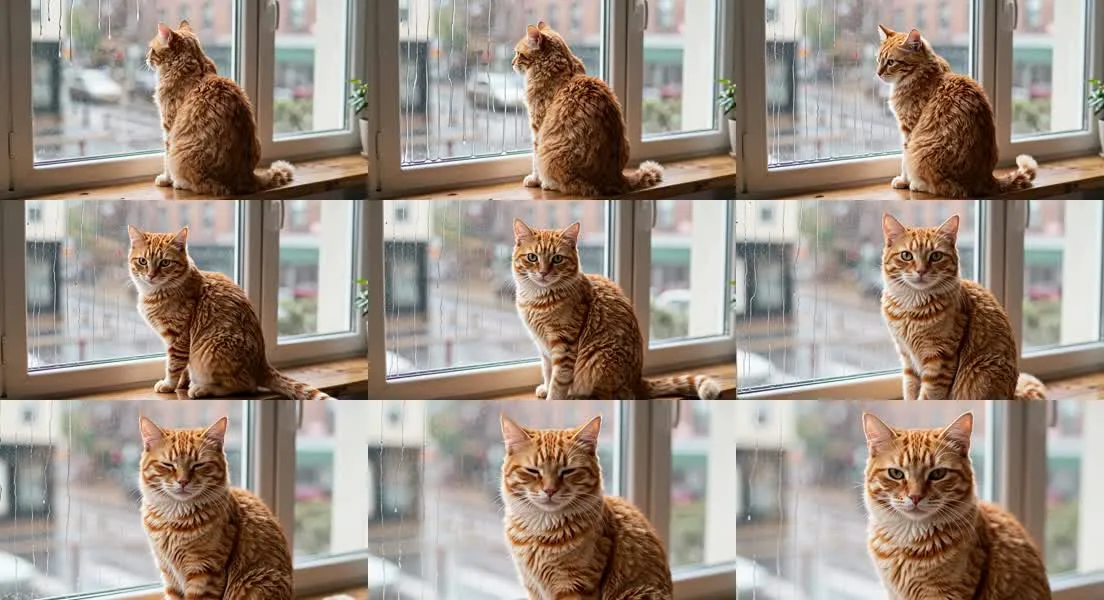
It took 67 seconds and returned a 6-second MP4 with sound at 736 × 400, keeping the photo's wide shape. The rain ran down the glass, the camera pushed in, and the cat blinked. But instead of turning only its head, it turned its whole body to face the camera, and its long, fluffy coat became a short, striped one on the way. If your subject has to stay exactly the same, start from an image where it already faces the camera, and ask for small movements.
On Kensa it takes four steps:
- Generate at your video's shape. 16:9 for YouTube, 9:16 for Reels, TikTok and Shorts, or 1:1 (1376 × 768, 768 × 1376 and 1536 × 1536 in our test). Kensa accepts JPG, PNG or WEBP up to 10 MB, so Z-Image Turbo's WebP files upload as they are. If you make the image in Kensa's AI Image Generator, its "Animate this image" button does step 2 for you.
- Upload it to Image to Video. The image becomes the first frame. Grok Image Video and Seedance 2.5 follow your image's aspect ratio rather than the one you select. For the other models, pick the ratio that matches your image.
- Describe one motion. One camera move and one subject action work best.
- Pick a model and generate. The credit price shows before you start, and if a generation fails, its credits are returned.
The smallest clip on each image-to-video model on Kensa, November 7, 2026:
| Model | Smallest clip | Credits | About (Basic plan) |
|---|---|---|---|
| Grok Image Video | 6 s at 480P | 5 | $0.18 |
| Seedance 1.5 Pro | 4 s at 480P | 8 | $0.28 |
| MiniMax H3 | 5 s at 480P | 8 | $0.28 |
| Veo 3.1 | 8 s | 13 | $0.46 |
| Seedance 2.5 | 4 s at 480P | 42 | $1.49 |
Dollar figures use the Basic plan, $9.90 a month for 280 credits; see pricing for the other plans and one-time packs. New accounts that sign up with Google get 15 free credits, valid for 72 hours. That covers the smallest clip on Grok Image Video, Seedance 1.5 Pro, MiniMax H3 or Veo 3.1, but not on Seedance 2.5.
Illustrations, products, pets, landscapes and original characters animate best. Celebrities, children, brand logos and copyrighted characters aren't supported. Most models also reject realistic photos of people, and a photorealistic generated person can be rejected the same way. You're never charged for a rejection.
FAQ
What is Z-Image Turbo?
Z-Image Turbo is a 6-billion-parameter text-to-image model from Alibaba's Tongyi-MAI lab, released on November 26, 2025. It generates an image in 8 steps, runs on consumer GPUs with 16 GB of VRAM, writes English and Chinese text, and is free under the Apache 2.0 license.
Is Z-Image Turbo free?
Yes. The weights are free to download and use, including commercially, under Apache 2.0. The official Hugging Face Space and ModelScope demo are free to try, with daily limits on Hugging Face. Hosted APIs charge about $0.004–$0.005 per standard-size image.
Can I use Z-Image Turbo images commercially?
Yes. Z-Image Turbo is released under Apache 2.0, which allows commercial use. If you use it through a third-party site or API, that site's terms apply as well.
How much VRAM does Z-Image Turbo need?
Tongyi-MAI says it fits on consumer GPUs with 16 GB of VRAM. On a Mac, Ollama's default fp8 version is a 13 GB download.
What is the difference between Z-Image and Z-Image Turbo?
Z-Image Turbo is the distilled, fast version: 8 steps and no guidance. Z-Image, released January 27, 2026, is the full model: 50 steps with guidance and negative prompts, so it is slower.
Can Z-Image Turbo edit images?
No. Turbo only generates images from text. The official editing model, Z-Image-Edit, was still listed as "to be released" on November 7, 2026.
Can Z-Image Turbo make videos?
No. It makes still images only. Upload the image to an image-to-video model to animate it; our test cat image became a 6-second clip with sound on Grok Image Video for 5 Kensa credits.
Does Kensa offer Z-Image Turbo?
Yes, since November 7, 2026. Kensa's AI Image Generator runs Z-Image Turbo at 1 credit per image (16:9, 9:16, 1:1, 4:3, 3:4, 3:2 or 2:3), and one click sends the image to Image to Video. You can also make the image anywhere else and upload it. Kensa is an independent product and is not affiliated with Alibaba.
Sources
- Tongyi-MAI/Z-Image on GitHub: release dates, model list, demo links, leaderboard note, read November 7, 2026
- Tongyi-MAI/Z-Image-Turbo on Hugging Face: specs, license, diffusers usage, read November 7, 2026
- Z-Image technical report (arXiv:2511.22699), November 27, 2025
- ComfyUI: Z-Image Turbo tutorial: model files and folders
- Ollama: x/z-image-turbo: macOS support and download sizes
- fal: Z-Image Turbo API docs: per-megapixel price
- EvoLink: Z-Image Turbo API: listed price; our billed price is from our own test, November 7, 2026
- Kensa credits: kensa.cc/pricing, from Kensa's billing configuration, November 7, 2026
Ready to create AI videos?
Try Kensa for free — new Google sign-ups get 15 credits
New on Kensa: MiniMax H3 — 5–15 s clips with audio, up to 2K →
Get StartedRelated Posts

GPT Image 2.6: Flare vs Sunburst, Price and GIFs (Nov 2026)
GPT Image 2.6 is OpenAI's November 4, 2026 image model: Flare (faster) and Sunburst (more detail) in the API, GIFs in ChatGPT. Prices, limits and how to animate it.
Grok Image Video by xAI: Complete Guide to Specs, Pricing & Prompts (2026)
How Grok Image Video works on Kensa: text or image to video, 6 or 10 seconds, 480p or 720p, a fixed 5 to 15 credits per clip. Specs, costs and prompt tips.

Is Seedance 2.5 Free? Price per Clip on Kensa (Oct 2026)
Is Seedance 2.5 free? Not on Kensa: the smallest clip (4s at 480P) costs 42 credits and Google sign-ups get 15. Prices per second and per clip by plan.