Earth Zoom Out Video Template
The Earth Zoom Out Video Template turns one photo of a place into a vertical 8-second clip: it opens on your scene, then the camera pulls straight up through the clouds until the whole Earth is visible from orbit. You upload a photo of a street, a beach or a rooftop view; it runs on Veo 3.1 in 9:16 with sound and costs 13 credits (about $0.69). The land around your spot is generated, not a real map. Post it on TikTok, Reels or Shorts.
Updated 2026-10-29 · Kensa team
Example made with this template
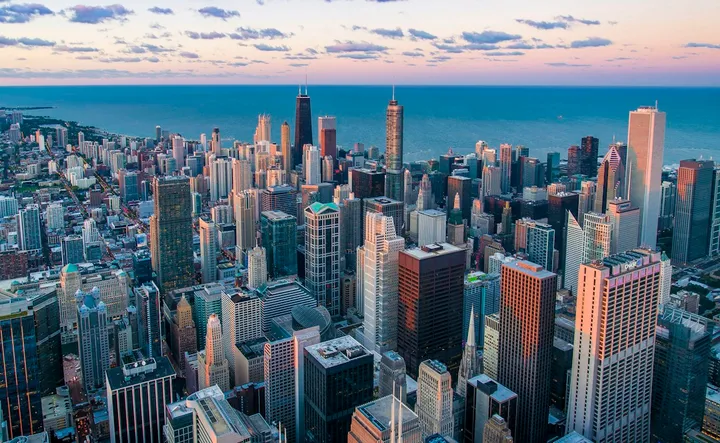
Input photo
Which photo works best?
Use a sharp, wide daytime photo of a place: a street, an ordinary town square, a beach or the view from a rooftop. Pick an everyday spot rather than a famous landmark. Keep people out of the frame: the video models reject photos of real people.
How do I use the Earth Zoom Out Video Template?
- 1
Open the template
Click “Use this template”. The image-to-video page opens with the zoom-out prompt, model, length and vertical aspect ratio already filled in.
- 2
Upload a photo of your place
Add one photo of the spot you want to start from. The first frame comes from this photo; everything the camera reveals after it is generated by the model.
- 3
Change the ending if you like
The prompt ends on the whole Earth from orbit. Edit the last part to stop just above the clouds, or to end on the night side of the planet with city lights.
- 4
Generate and download
Generate the clip, check that the opening frame still looks like your place, then download the MP4 and post it.
How can I make it my own?
- Photos taken from a balcony, a rooftop or a hilltop usually blend into the pull-out more smoothly than street-level shots, because the camera is already looking down.
- Keep the single move. The whole trip from the ground to orbit has to fit into 8 seconds, so an extra pan or spin makes it feel rushed.
- Describe the land you want to see on the way up (a long sandy coast, snowy mountains, a river valley) to steer the geography the model invents.
- Pick a photo in portrait orientation so it fills the 9:16 frame without heavy cropping.
What prompt does this template use?
This is the prompt filled into the generator. Edit it freely before you generate.
Start on the exact scene from the photo, unchanged. Then the camera pulls straight up and away in one smooth, continuous move: the place from the photo shrinks far below, the surrounding land and coastline spread out, the camera rises through a layer of white clouds, the sky fades to black, and the whole Earth comes into view from orbit, a blue planet against the stars. One unbroken shot with no cuts. Photorealistic. No text or logos. No people.
Frequently asked questions
Will the zoom out show the real map around my location?
No. The clip starts from your photo, but everything the camera reveals after that (the neighborhood, the coastline, the continents) is invented by the model. It looks like a real place seen from above, not a satellite view of where you are, so don't present it as an accurate map.
Why does my clip jump or morph instead of zooming out smoothly?
Going from street level to orbit in 8 seconds is a big move, and sometimes the model cuts or morphs halfway instead of rising in one shot. Regenerate, or start from a photo taken from higher up. Each attempt costs 13 credits, so check the first try before making more.
Does the video have sound?
Yes. Veo 3.1 generates audio with every clip. If it doesn't suit your post, mute it and add your own music in your editor or in the app you post from.
Can I start from a photo of my own house or street?
Yes, as long as nobody is in the frame. Keep in mind that a recognizable shot of your home, plus a caption naming the area, tells viewers roughly where you live, so think about that before you post it publicly.