AI Video Camera Movement Prompts With Real Results

Every prompt on this page was run on Kensa and is shown with the clip it produced: a drone shot over a misty lake and a handheld chef-and-flaming-wok shot, each sent unchanged to 6 of Kensa's models, plus a fireworks crane-up, a day-to-night time-lapse and an Earth zoom-out. Each card lists the model, settings, credits (5 to 83 per clip) and render time, and says whether the camera actually moved the way the prompt asked, which it often didn't.

By Alex Xu, founder of Kensa · Updated November 4, 2026

How we tested

  • Every clip is a real Kensa output from the exact prompt shown, compressed for the web and not edited.
  • Render time runs from submission to the finished file at the model provider; queueing on Kensa is not included.
  • Credits are today's Kensa prices for the settings shown; ≈ USD uses the Starter Pack ($14.90 for 280 credits).
  • AI video changes from run to run. Treat each clip as an example of what the prompt can do, not a guarantee.

Drone shot, compared across models

One question for this prompt: does the camera fly where we asked? The same text went unchanged to six of Kensa's models on November 4, 2026, one run each.

Drone shot over a misty lake

Text to video

A slow aerial approach with a clear destination, the cabin, so you can see which model follows the path.

Prompt

A slow aerial drone shot glides over a misty mountain lake at sunrise toward a small wooden cabin on the shore, pine forests on both sides, a flock of birds crosses the frame, golden light breaking through the fog, soft wind and distant birdsong.

Result: Seedance 1.5 Pro and Grok Image Video flew toward the cabin as asked. MiniMax H3 flew away from it, and Seedance 2.0 stayed so high that the cabin was a speck.

  • Veo 3.1

    8s · 16:9 · 13 credits (≈ $0.69) · 67 s render · 1280×720

    Pushes straight in to the cabin with a huge flock bursting through, but it looks more like a postcard, with red lens flares that feel fake.

  • Seedance 2.0

    8s · 480P · 16:9 · 62 credits (≈ $3.30) · 309 s render · 864×496

    Gorgeous light rays, but the camera stays so high that the cabin is just a speck. The slowest render of the day, at over five minutes.

  • Seedance 2.5

    8s · 480P · 16:9 · 83 credits (≈ $4.42) · 157 s render · 854×480

    Tells a little story: the fog slowly clears to reveal the cabin, smoke rising from the chimney. The moodiest shot, though dark and soft at 480P.

  • MiniMax H3

    8s · 768P · 16:9 · 20 credits (≈ $1.06) · 45 s render · 1344×768

    Sharp and realistic, but it flies the wrong way: it starts right above the cabin and heads out over the lake, away from it.

  • Seedance 1.5 Pro

    8s · 720P · 16:9 · 32 credits (≈ $1.70) · 110 s render · 1280×720

    The best camera path: it glides across the lake and lands right at the cabin. The light is cooler and bluer than the golden sunrise in the prompt.

  • Grok Image Video

    6s · 480P · 16:9 · 5 credits (≈ $0.27) · 56 s render · 752×416

    Quietly does the job: golden fog, birds and a camera that flies toward the cabin, in a shorter, low-resolution clip.

Source: Same-prompt test, November 4, 2026 (same method as our monthly benchmark)
Handheld action, compared across models

A handheld close-up with fire and flying food: hands, flames and objects in the air are where AI video usually falls apart. Same day, same rules.

Chef tossing a flaming wok

Text to video

A cinematic kitchen shot with handheld energy, warm tungsten light and a loud sound cue.

Prompt

A chef in a busy restaurant kitchen tosses vegetables in a flaming wok, flames leaping up as the food flips in the air, steam and sparks rising, handheld medium close-up, loud sizzling and kitchen clatter, warm tungsten light, cinematic.

Result: Seedance 2.0 made the most believable toss and MiniMax H3 the sharpest picture; Veo 3.1 stirred instead of tossing, and Seedance 2.5's flames broke up at 480P.

  • Veo 3.1

    8s · 16:9 · 13 credits (≈ $0.69) · 78 s render · 1280×720

    Opens with the biggest burst of fire and sparks and the busiest kitchen, but the food mostly stays in the pan: more of a stir than a toss.

  • Seedance 2.0

    8s · 480P · 16:9 · 62 credits (≈ $3.30) · 187 s render · 864×496

    The most believable toss: the vegetables leave the pan and drop back in, with fire licking the edge of the wok. It took over three minutes.

  • Seedance 2.5

    8s · 480P · 16:9 · 83 credits (≈ $4.42) · 165 s render · 854×480

    The most cinematic, a wall of fire with vegetables flying through it, but at 480P the flames turn into flat orange blobs and the chef disappears behind them.

  • MiniMax H3

    8s · 768P · 16:9 · 20 credits (≈ $1.06) · 45 s render · 1344×768

    The sharpest image of the six, with believable flames and a small flip of the beans, and the fastest render.

  • Seedance 1.5 Pro

    8s · 720P · 16:9 · 32 credits (≈ $1.70) · 110 s render · 1280×720

    One big toss with sparks early on, then the flame just sits next to the wok like a torch.

  • Grok Image Video

    6s · 480P · 16:9 · 5 credits (≈ $0.27) · 66 s render · 752×416

    Dark and moody, with food and fire flying: close to the prompt, though only 6 seconds long and the lowest resolution here.

Source: Same-prompt test, November 4, 2026 (same method as our monthly benchmark)
Big camera moves on one model

Three single-model prompts built around one camera move. The Earth zoom-out and the time-lapse start from a photo (image-to-video); the fireworks are text only. Each was run once on Veo 3.1.

Earth zoom-out

Image to video: start from your photo

The viral pull-out: start on a place, rise through the clouds, end on the planet.

Prompt

Start on the exact scene from the photo, unchanged. Then the camera pulls straight up and away in one smooth, continuous move: the place from the photo shrinks far below, the surrounding land and coastline spread out, the camera rises through a layer of white clouds, the sky fades to black, and the whole Earth comes into view from orbit, a blue planet against the stars. One unbroken shot with no cuts. Photorealistic. No text or logos. No people.

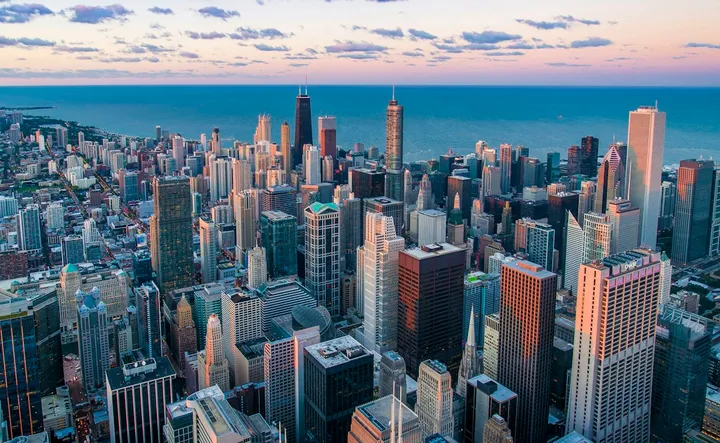
Starting frame for Earth zoom-out (Unsplash)
Input photo (Unsplash)
Model
Veo 3.1
Settings
8s · 9:16
Cost
13 credits (≈ $0.69)
Render time
109 s
Output
720×1280
Generated
October 28, 2026

What we saw: Rises smoothly from the skyline through the clouds, but around the 4-second mark it morphs instead of pulling out: a whole Earth appears above an orbital horizon and then grows larger, the opposite of zooming out.

Try this prompt

Opens Image to Video with these settings filled in. Upload your own photo there.

Source: Earth Zoom Out Video Template

Day-to-night time-lapse

Image to video: start from your photo

A locked-off time-lapse from one still photo: golden hour, dusk, then stars.

Prompt

Locked-off camera on a tripod, no camera movement at all. Keep the layout of the scene from the photo exactly as it is while time speeds up: late-afternoon light turns into warm golden hour, the sun sets, clouds race across the sky, the sky fades through deep blue into night, any windows and street lights in the scene switch on one by one, and stars fill the sky. Smooth, realistic day-to-night time-lapse. No text or logos. No people.

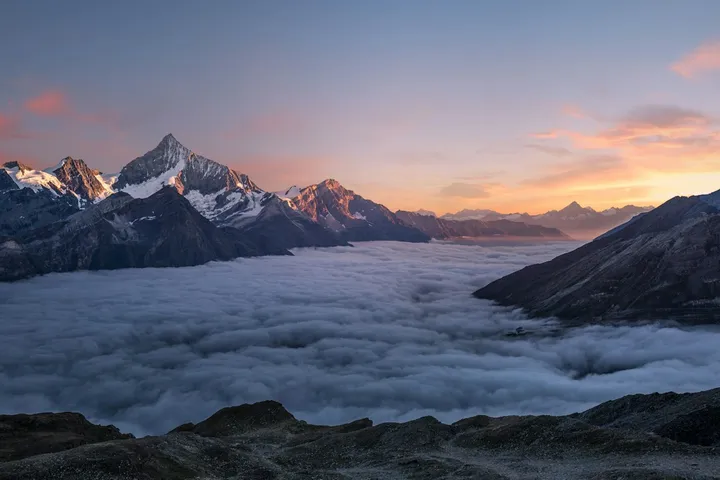
Starting frame for Day-to-night time-lapse (Unsplash)
Input photo (Unsplash)
Model
Veo 3.1
Settings
8s · 16:9
Cost
13 credits (≈ $0.69)
Render time
298 s
Output
1280×720
Generated
October 28, 2026

What we saw: The camera and the mountains stay locked while the light goes from sunset to a starry sky with the Milky Way, and the sea of clouds keeps moving. The photo had no windows or street lights, so that part of the prompt had nothing to act on.

Try this prompt

Opens Image to Video with these settings filled in. Upload your own photo there.

Source: Time-Lapse Video Template

Fireworks crane-up

Text to video

A text-only New Year shot: fireworks over a skyline, reflected in a river, with a slow crane-up.

Prompt

Fireworks burst over a modern city skyline at midnight on New Year's Eve. Gold, red and silver shells bloom high above the glowing towers and fall in shimmering trails, and their colors reflect on a calm river in the foreground. The camera starts low near the water and makes one slow crane-up to reveal the full skyline and sky. Sound: crackling fireworks and deep booms echoing across the water. Cinematic night shot with rich colors and light haze. No people, no text, no brand names or logos on the buildings.

Model
Veo 3.1
Settings
8s · 16:9
Cost
13 credits (≈ $0.69)
Render time
76 s
Output
1280×720
Generated
October 28, 2026

What we saw: Gold, red and silver fireworks reflect in the river as asked, but the camera barely moves: the opening and closing shots are framed almost the same, so the crane-up from the water never happens.

Try this prompt

Opens Text to Video with this prompt and these settings filled in.

Source: New Year Video Template

How to write prompts like these

The prompts above follow the same five parts. For camera prompts, the camera line does the most work:

  1. 1

    Subject

    Give the shot a destination: “toward a small wooden cabin on the shore” tells the model where the move ends, and makes it easy to see when it goes wrong.

  2. 2

    Action

    Add one thing that moves besides the camera, so the shot has depth: “a flock of birds crosses the frame”, “clouds race across the sky”, “flames leaping up as the food flips in the air”.

  3. 3

    Camera

    One move, with speed and direction: “a slow aerial drone shot glides over”, “pulls straight up and away in one smooth, continuous move”, “locked-off camera on a tripod, no camera movement at all”. Add “one unbroken shot with no cuts” for long moves. Even then, check the result: in our tests one model flew the wrong way and two moves came out as a morph or a static shot.

  4. 4

    Light

    Time of day sets the mood: “at sunrise, golden light breaking through the fog”, “warm tungsten light”, “cinematic night shot with rich colors and light haze”.

  5. 5

    Sound

    Name the soundscape: “soft wind and distant birdsong”, “loud sizzling and kitchen clatter”, “crackling fireworks and deep booms echoing across the water”. Every clip in the side-by-side tests came with sound.

Questions about these prompts

Why didn't the camera move the way I asked?

Video models follow camera directions loosely. In our drone test, MiniMax H3 started above the cabin and flew away from it; our fireworks clip barely moved; the Earth zoom-out morphed halfway. Keep to one move, give it a direction and an end point, and regenerate when it misses. Drafting on a cheaper model first keeps retries affordable.

Which model follows camera directions best?

In the drone test, Seedance 1.5 Pro flew the most accurate path and landed at the cabin, and Grok Image Video also flew toward it. Seedance 2.5 had the most atmospheric reveal. That is one run per model, so compare the clips above rather than treating it as a ranking.

Can I use these camera moves on my own photo?

Yes. The Earth zoom-out and time-lapse prompts are image-to-video: your photo becomes the first frame and the prompt only describes the move. The land, sky and lights the model adds are generated, not a real map or real footage.

More tested prompts and clips

All prompt collections →