Christmas AI Video Prompts With Real Results

Every prompt on this page was run once on Kensa on November 10, 2026 and is shown with the clip it produced: photo prompts that turn a Christmas ornament, a gift box or a candle into a holiday ad and put a Santa hat on a dog, plus text prompts for a fireplace, a snowy village, a Christmas market, Santa's sleigh, a greeting card and a New Year's Eve window. Each card lists the model, settings, credits (5 to 42 per clip), render time and what went wrong.

By Alex Xu, founder of Kensa · Updated November 10, 2026

How we tested

  • Every clip is a real Kensa output from the exact prompt shown, compressed for the web and not edited.
  • Render time runs from submission to the finished file at the model provider; queueing on Kensa is not included.
  • Credits are today's Kensa prices for the settings shown; ≈ USD uses the Starter Pack ($14.90 for 280 credits).
  • AI video changes from run to run. Treat each clip as an example of what the prompt can do, not a guarantee.

Christmas product ads from one photo

These are image-to-video prompts for shops: upload a clean photo of your product and the prompt adds the holiday scene and the motion. Our product photos were made with Z-Image Turbo, the model behind Kensa's AI Image Generator, and each prompt was run once.

Glass ornament on a lit tree

Image to video: start from your photo

Turns a plain ornament packshot into a vertical holiday ad with a tree, lights and snow.

Prompt

The red glass ornament from the photo slowly turns on its gold ribbon. Behind it, a Christmas tree comes into soft focus with warm fairy lights twinkling, and a few snowflakes drift past. Slow push-in. Sound: soft sleigh bells and a gentle chime. Keep the ornament's shape, color and gold glitter pattern exactly as in the photo. No text, no logos.
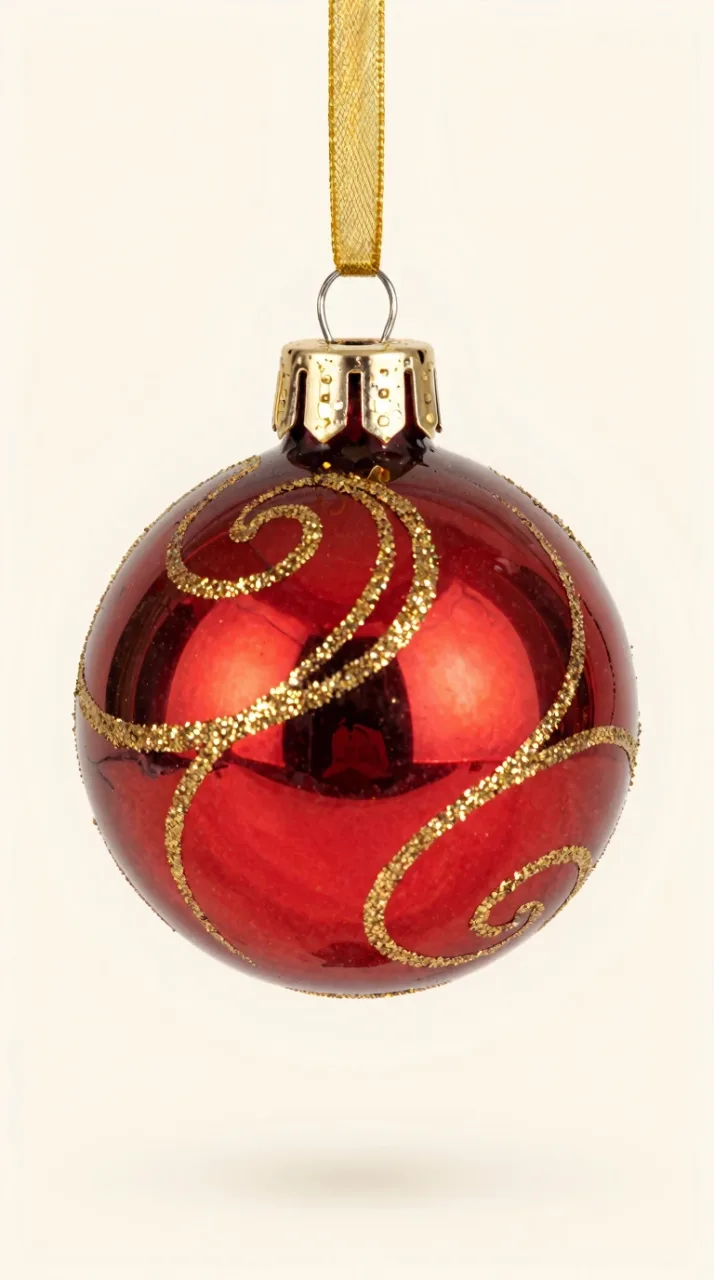
Starting frame for Glass ornament on a lit tree (AI-generated with Z-Image Turbo)
Input photo (AI-generated with Z-Image Turbo)
Model
Grok Image Video
Settings
6s · 480P · 9:16
Cost
5 credits (≈ $0.27)
Render time
49 s
Output
400×736
Generated
November 10, 2026

What we saw: The cream backdrop becomes a lit Christmas tree within the first second, the camera pushes in and the ornament slowly turns. The gold swirls change shape as it turns, so the back of the ornament is made up, and the snowflakes are flat clip-art shapes rather than real snow.

Try this prompt

Opens Image to Video with these settings filled in. Upload your own photo there.

Source: Kensa Christmas prompt test, November 10, 2026 (one run per prompt)

Gift box opening with golden light

Image to video: start from your photo

A square reveal clip for a gift set, a subscription box or a holiday sale post.

Prompt

The lid of the gift box from the photo lifts off by itself and warm golden light and sparkles pour out of the box, while the red velvet bow loosens. The camera slowly pushes in at table height. Sound: a soft whoosh and twinkling chimes. Keep the green wrapping paper and red ribbon exactly as in the photo. No hands, no text.

Starting frame for Gift box opening with golden light (AI-generated with Z-Image Turbo)
Input photo (AI-generated with Z-Image Turbo)
Model
Seedance 1.5 Pro
Settings
5s · 480P · 1:1
Cost
10 credits (≈ $0.53)
Render time
56 s
Output
640×640
Generated
November 10, 2026

What we saw: The lid lifts and a burst of golden light and glitter comes out, spilling onto the table by the end. The bow vanishes and the ribbon ends up on both the lid and the box at once before a loose piece flies off, which a sharp-eyed viewer will notice.

Try this prompt

Opens Image to Video with these settings filled in. Upload your own photo there.

Source: Kensa Christmas prompt test, November 10, 2026 (one run per prompt)
Candle by a snowy window

Image to video: start from your photo

A calm vertical clip for candles, mugs or any cozy home product.

Prompt

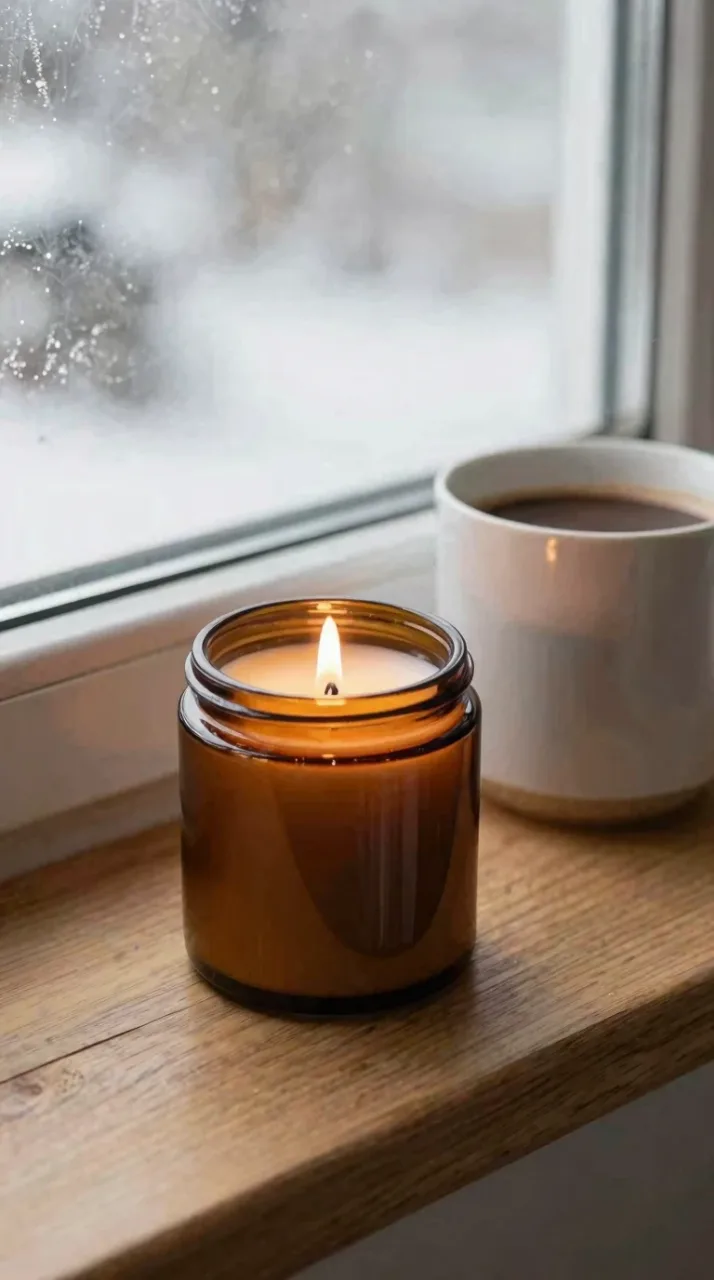
The candle flame from the photo flickers gently, snow starts falling outside the frosted window, and a thin curl of steam rises from the mug of cocoa. The camera slowly dollies in toward the candle. Sound: a quiet crackle and soft winter wind outside. Keep the amber glass jar and the mug exactly as in the photo, with no label or text.

Starting frame for Candle by a snowy window (AI-generated with Z-Image Turbo)
Input photo (AI-generated with Z-Image Turbo)
Model
MiniMax H3
Settings
6s · 480P · 9:16
Cost
9 credits (≈ $0.48)
Render time
29 s
Output
480×864
Generated
November 10, 2026

What we saw: A slow dolly-in toward the candle, with a flickering flame and snow falling outside the frosted window; the jar and mug keep their shape. The steam from the cocoa is only a faint wisp, and at 480P the whole frame is soft.

Try this prompt

Opens Image to Video with these settings filled in. Upload your own photo there.

Source: Kensa Christmas prompt test, November 10, 2026 (one run per prompt)
Pets and cozy holiday scenes

One photo prompt that dresses a dog up for Christmas, and two text prompts for the warm, snowy scenes people use as greetings and backgrounds. Each was run once.

Dog in a Santa hat

Image to video: start from your photo

Puts a Santa hat on the pet in your photo for a holiday Reel or card.

Prompt

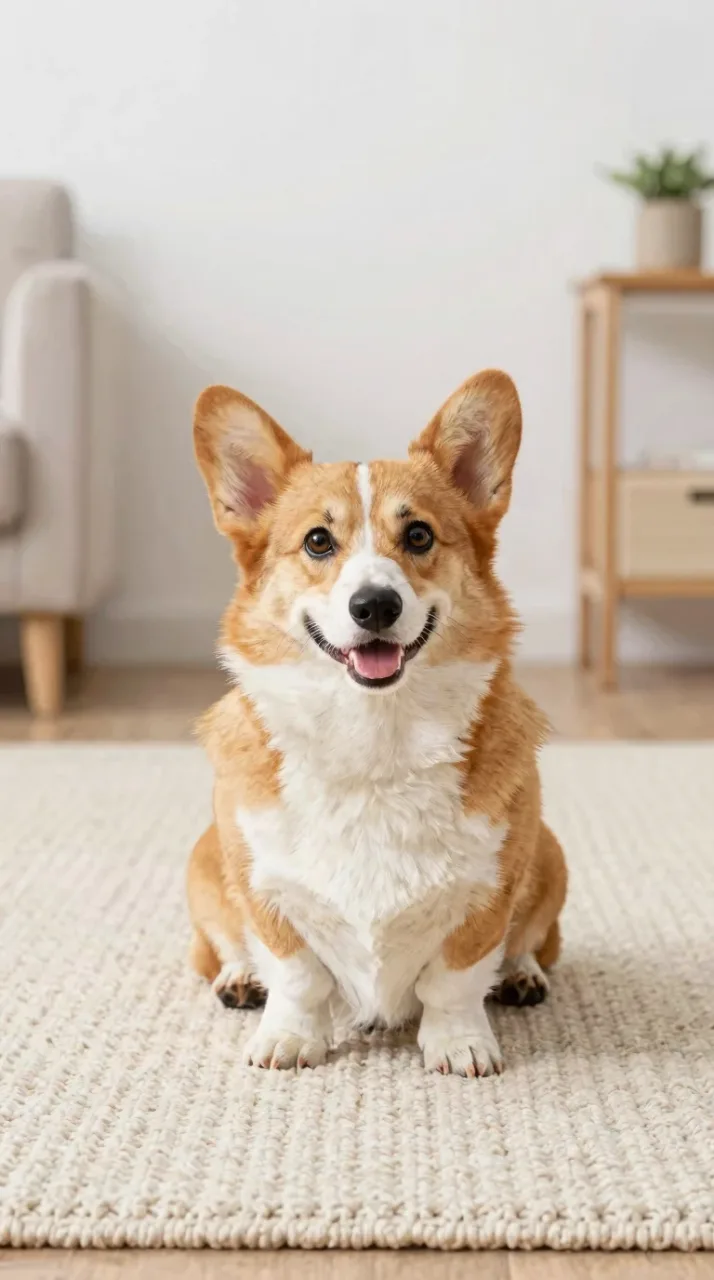
The dog from the photo is now wearing a small red Santa hat. It tilts its head, wags its tail and looks up at the camera while warm Christmas lights twinkle in the background. Steady camera at the dog's eye level. Sound: soft jingle bells. Keep the dog's fur color, markings and face exactly as in the photo, with four legs and one tail.

Starting frame for Dog in a Santa hat (AI-generated with Z-Image Turbo)
Input photo (AI-generated with Z-Image Turbo)
Model
Grok Image Video
Settings
6s · 480P · 9:16
Cost
5 credits (≈ $0.27)
Render time
47 s
Output
400×736
Generated
November 10, 2026

What we saw: The Santa hat pops onto the corgi within the first second and sits crooked while it tilts its head, then straightens. Fairy lights appear on the wall behind, the tail wags, and the face and markings stay as in the photo.

Try this prompt

Opens Image to Video with these settings filled in. Upload your own photo there.

Source: Kensa Christmas prompt test, November 10, 2026 (one run per prompt)

Cat asleep by the fireplace

Text to video

A warm Christmas Eve scene with a fire, stockings and falling snow, no photo needed.

Prompt

A cozy living room on Christmas Eve: a fire crackles in a stone fireplace, red stockings hang from the mantel, and a ginger cat sleeps on a knitted rug in front of it while snow falls outside the window. The camera slowly pushes in toward the fire. Sound: crackling fire and a soft music box melody. Warm firelight, shallow depth of field, no people, no text.

Model
Seedance 1.5 Pro
Settings
5s · 480P · 16:9
Cost
10 credits (≈ $0.53)
Render time
57 s
Output
864×496
Generated
November 10, 2026

What we saw: Everything the prompt lists is there: stockings on the mantel, snow falling outside both windows and a ginger cat asleep on a knitted rug. The push-in is far from slow, though, and ends on a close-up of the cat in front of the fire.

Try this prompt

Opens Text to Video with this prompt and these settings filled in.

Source: Kensa Christmas prompt test, November 10, 2026 (one run per prompt)

Snowy village at night, from above

Text to video

A slow aerial shot of a glowing village and its Christmas tree for intros and greetings.

Prompt

A slow aerial shot glides over a small snowy village at night. Warm light glows in every window, a tall Christmas tree shines in the town square, and snow falls steadily. The camera drifts forward and slightly down toward the tree. Sound: distant church bells and soft wind. No people, no text.

Model
MiniMax H3
Settings
6s · 480P · 16:9
Cost
9 credits (≈ $0.48)
Render time
24 s
Output
832×480
Generated
November 10, 2026

What we saw: A steady aerial glide over glowing windows toward a big lit tree in the square, drifting forward and down as asked; the fastest render on this page. The steady snowfall shows up as only a few faint specks against the sky.

Try this prompt

Opens Text to Video with this prompt and these settings filled in.

Source: Kensa Christmas prompt test, November 10, 2026 (one run per prompt)

Santa, markets, cards and New Year

Text prompts for the classic holiday moments, from a Christmas market to Santa crossing the moon to a Merry Christmas card. Each was run once; one of them tests whether a model can spell a greeting.

Christmas market at dusk

Text to video

A handheld walk between lit market stalls for travel, food and event posts.

Prompt

A walk through a Christmas market at dusk: wooden stalls hung with string lights, steaming mugs of mulled wine on a counter, gingerbread hearts and glass ornaments for sale, and light snow falling. Handheld camera moving slowly forward between the stalls. Sound: crowd chatter and a distant choir. Shoppers seen only from behind, no readable signs or logos.

Model
Seedance 2.5
Settings
4s · 480P · 16:9
Cost
42 credits (≈ $2.24)
Render time
148 s
Output
854×480
Generated
November 10, 2026

What we saw: String lights, hanging glass ornaments, rows of steaming mulled wine and stacked gingerbread hearts, with shoppers seen from behind, as asked. The camera glides along one stall rather than walking between several, the clip is only 4 seconds, and it was the slowest render here.

Try this prompt

Opens Text to Video with this prompt and these settings filled in.

Source: Kensa Christmas prompt test, November 10, 2026 (one run per prompt)

Santa's sleigh across the moon

Text to video

A storybook greeting shot with sleigh bells, made from text alone.

Prompt

Santa Claus in a red sleigh pulled by eight reindeer flies across a huge full moon above snowy rooftops at night, leaving a trail of golden sparkles. The camera tracks alongside, then lets the sleigh fly off into the stars. Sound: sleigh bells and a whoosh of wind. Storybook look, no text.

Model
Veo 3.1
Settings
8s · 16:9
Cost
13 credits (≈ $0.69)
Render time
80 s
Output
1280×720
Generated
November 10, 2026

What we saw: The closest match on the page: Santa's sleigh and a team of reindeer cross a full moon above snowy rooftops, leave a gold sparkle trail, then shrink away into the stars. It has an illustrated storybook look and is the sharpest clip here.

Try this prompt

Opens Text to Video with this prompt and these settings filled in.

Source: Kensa Christmas prompt test, November 10, 2026 (one run per prompt)

Greeting card that says Merry Christmas

Text to video

A card that opens on its own; it shows whether the model writes the words correctly.

Prompt

A red greeting card lies on a wooden table among pine branches and pinecones. The card opens by itself, and gold glitter letters inside read "Merry Christmas". Snowflakes drift down onto the table. Slow top-down push-in. Sound: paper rustling and a soft chime.

Model
Grok Image Video
Settings
6s · 480P · 16:9
Cost
5 credits (≈ $0.27)
Render time
57 s
Output
752×416
Generated
November 10, 2026

What we saw: “Merry Christmas” is spelled correctly in gold script in every frame, with snow falling on the table and a slow top-down push-in. The card is already open when the clip starts, so the opening the prompt asks for never happens.

Try this prompt

Opens Text to Video with this prompt and these settings filled in.

Source: Kensa Christmas prompt test, November 10, 2026 (one run per prompt)

New Year's Eve fireworks through a frosted window

Text to video

Carries the holiday look into a New Year countdown post.

Prompt

Midnight on New Year's Eve, seen through a frosted window: fireworks burst in gold and silver over a snowy mountain town, and a lit Christmas tree inside the room reflects softly in the glass. Gold confetti drifts past the window. The camera slowly pushes in toward the window. Sound: fireworks booming and distant cheering. No people in view, no text.

Model
Seedance 1.5 Pro
Settings
5s · 480P · 16:9
Cost
10 credits (≈ $0.53)
Render time
56 s
Output
864×496
Generated
November 10, 2026

What we saw: Gold and silver fireworks burst over a snowy mountain town behind a frosted window. The push-in goes so far that the window frame nearly slides out of view, the Christmas tree stands outside in the town instead of reflecting in the glass, and the confetti never appears.

Try this prompt

Opens Text to Video with this prompt and these settings filled in.

Source: Kensa Christmas prompt test, November 10, 2026 (one run per prompt)

How to write prompts like these

The prompts above follow the same five parts. Write one shot, in plain sentences, in this order:

  1. 1

    Subject

    With a photo, name what is in it and protect it: “The red glass ornament from the photo … Keep the ornament's shape, color and gold glitter pattern exactly as in the photo.” Without a photo, set the whole scene in one sentence: a fireplace, stockings on the mantel, a cat asleep on the rug.

  2. 2

    Action

    Give one or two clear motions: the lid lifts and light pours out, the dog tilts its head and wags its tail, the card opens. The more extra details you stack up, the more the model drops; see the New Year window, where the confetti never appeared.

  3. 3

    Camera

    Name one move: “slow push-in”, “slow dolly in”, “handheld camera moving forward”, “aerial shot drifting forward and down”. Models tend to overdo a push-in, so add “slight” when you want it subtle.

  4. 4

    Light

    Christmas light does most of the work: “warm fairy lights twinkle”, “warm firelight”, “warm light glows in every window”. Every clip on this page that asked for warm light got it.

  5. 5

    Sound

    Every model on this page generated sound with the clip. Ask for it: “soft sleigh bells”, “crackling fire and a soft music box melody”, “distant church bells”.

Questions about these prompts

Can I use these prompts with a photo of my own product?

Yes. The first three prompts are image-to-video: upload a clean product photo, paste the prompt, and replace the product words with yours (“the scented candle from the photo”). Keep the sentence that tells the model to keep the product exactly as in the photo. If you don't have a photo yet, you can make one in Kensa's AI Image Generator first.

Can an AI video write “Merry Christmas” correctly?

In our run, yes: Grok Image Video spelled “Merry Christmas” correctly in every frame, although the card was already open instead of opening on screen. One run is not a guarantee, so keep greetings short, check the spelling, and add the text afterwards in a video editor if a card has to be perfect.

Can I put a Santa hat on my own dog or cat?

Yes, with the Santa hat prompt and a clear photo of your pet on its own. Keep people out of the photo, because photos of real people are rejected. Check the face and markings in the result before you post it.

Which model should I use for Christmas videos?

Each prompt here ran on one model, so this page is not a model comparison. On these runs, Grok Image Video was the cheapest clip, MiniMax H3 the fastest render, Veo 3.1 the sharpest and closest to its prompt, and Seedance 2.5 the most expensive and slowest. For side-by-side results on the same prompt, see the monthly AI video model benchmark.

More tested prompts and clips

All prompt collections →